

How to Change Gamma in CS2
This guide explains how gamma and brightness work in CS2 and how to adjust them for better visibility. It also covers monitor and GPU settings that can improve clarity without hurting performance.
August 18, 202609:37 AM

 CS2
CS2Esports World Cup 2026

betboom

nip
Winio Prediction
Before draft
After draft
Prediction: 2 maps
46.1%Round 1 (1st half)
50.9%Prediction: BetBoom
49.1%Round 13 (2nd half)
51.0%Prediction: BetBoom
49.0%| Player | K | D | A | ADR | KAST% | HS | FK | FK± |
|---|---|---|---|---|---|---|---|---|
| BetBoom | ||||||||
| 12 | 14 | 2 | 93.4 | 62.5% | 8 | - | - | |
| 9 | 12 | 3 | 65.2 | 81.2% | 6 | - | - | |
| 7 | 14 | 3 | 43.4 | 56.2% | 5 | - | - | |
| 6 | 12 | 0 | 52.9 | 37.5% | 2 | - | - | |
| 3 | 13 | 4 | 38.0 | 50% | 1 | - | - | |
| Ninjas in Pyjamas (W) | ||||||||
| 23 | 6 | 1 | 134.5 | 93.8% | 12 | - | - | |
| 16 | 10 | 3 | 97.8 | 87.5% | 8 | - | - | |
| 9 | 7 | 4 | 55.8 | 75% | 0 | - | - | |
| 9 | 7 | 3 | 67.8 | 75% | 5 | - | - | |
| 8 | 7 | 2 | 51.1 | 87.5% | 4 | - | - | |
| Player | K | D | A | ADR | KAST% | HS | FK | FK± |
|---|---|---|---|---|---|---|---|---|
| BetBoom | ||||||||
| 20 | 16 | 5 | 80.7 | 58.3% | 7 | - | - | |
| 16 | 13 | 4 | 68.1 | 87.5% | 10 | - | - | |
| 16 | 17 | 5 | 80.3 | 70.8% | 12 | - | - | |
| 13 | 17 | 6 | 64.8 | 70.8% | 3 | - | - | |
| 11 | 17 | 6 | 61.0 | 70.8% | 7 | - | - | |
| Ninjas in Pyjamas (W) | ||||||||
| 26 | 14 | 7 | 119.6 | 75% | 13 | - | - | |
| 16 | 15 | 8 | 68.0 | 75% | 8 | - | - | |
| 14 | 16 | 5 | 51.3 | 79.2% | 4 | - | - | |
| 14 | 14 | 4 | 67.8 | 66.7% | 8 | - | - | |
| 10 | 17 | 6 | 56.7 | 58.3% | 2 | - | - | |
No data
No data
Explore a detailed breakdown of the betboom vs nip match at Esports World Cup 2026. Winio's analytical model processed every phase of the game, identified the decisive factors, and measured how closely the pre-match prediction matched the actual result.
Use finished match data to understand how Winio's model performs over time. Each completed match adds to the prediction history available at the Ended Matches section.
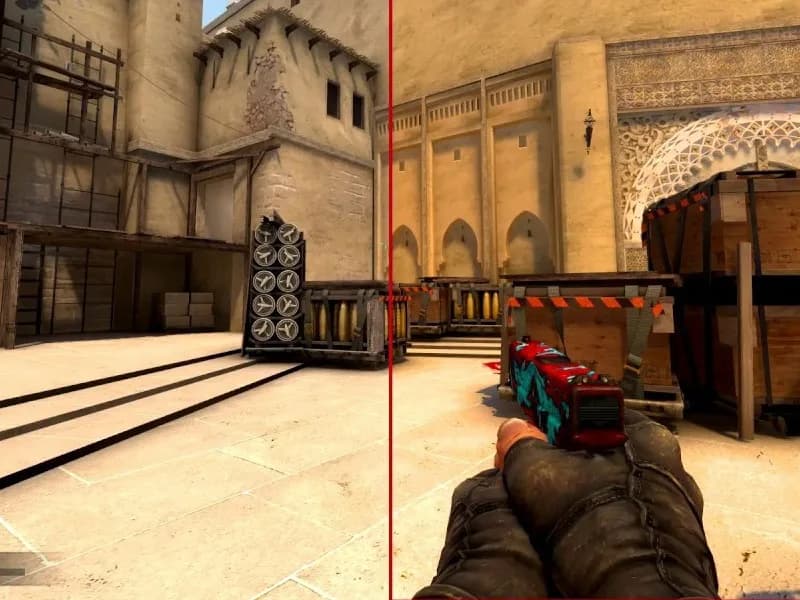
This guide explains how gamma and brightness work in CS2 and how to adjust them for better visibility. It also covers monitor and GPU settings that can improve clarity without hurting performance.
Copy NiKo's latest CS2 settings: 800 DPI, 720 eDPI, crosshair code, 1280x960 resolution, viewmodel, video settings, gear.

This guide explains how interpolation works in CS2 and why many old CS:GO commands are no longer relevant. It also shows how to use packet buffering to improve smoothness based on your connection stability.